¶ Sign-up logs
¶ Overview
The Sign-up logs table records every action a lead performs while going through the Sign-up flow — the multi-step registration application where potential customers check coverage, choose a plan, and sign up for services on their own.

Each entry shows the date and time of the action, the lead it belongs to, the operation (the sign-up step), and the result. Together the entries let you trace how far a lead progressed through registration and where a sign-up was completed or abandoned.
The table contains the following columns:
- Date and time — when the action was performed.
- Lead — the lead that performed the action. Leads are created automatically the moment a visitor starts the Sign-up Flow.
- Operation — the sign-up step that was performed (for example, Check address coverage, Select plan, or Register as customer).
- Result — the outcome of the operation, such as Success or an error message if the step failed.
- Actions — opens the details of the selected entry.
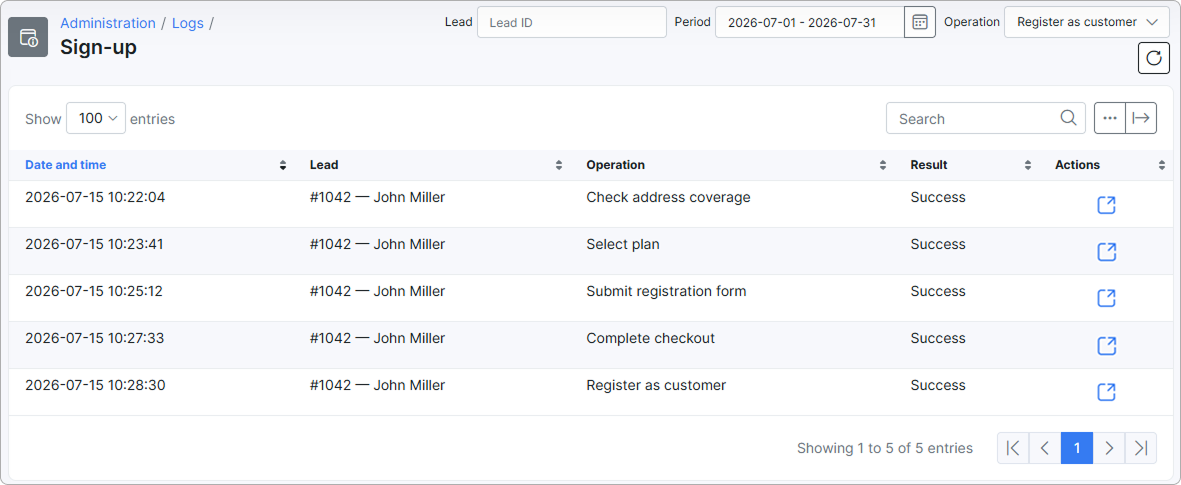
To view the full details of an entry, click the View icon  in the Actions column. The details include the date, time, lead, operation description, result, and any attributes submitted at that step.
¶ Filter
At the top of the page you can narrow down the entries using the following filters:

- Lead — enter a Lead ID to show only the actions of a specific lead.
- Period — select a date range to show entries from a particular period of time.
- Operation — show only a specific sign-up step. The dropdown lists every step of the Sign-up Flow:
- All
- Check address coverage
- Select plan
- Submit registration form
- Select additional services
- Complete checkout
- Sign contract
- Register as customer
¶ Export and table management
Use the Search field to find a specific entry.
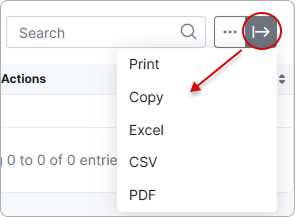
With the export  icon at the top-right corner of the page you can print or copy the list, or save it as a PDF or CSV file:
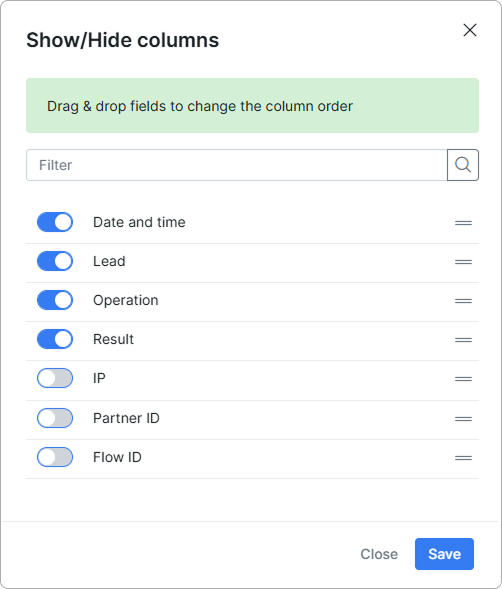
Click the breadcrumbs  icon to choose which columns are displayed by enabling or disabling each item, and drag and drop them to rearrange the order.